
AI Agents for Work & Small Business: When Should You Actually Use One?
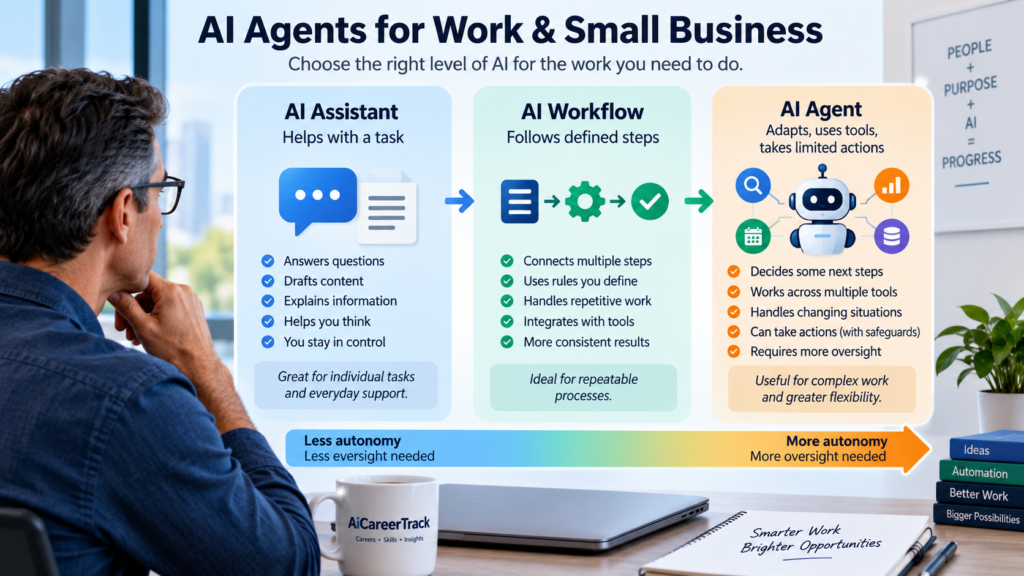
AI agents for small business and work are becoming easier to build, easier to connect to workplace systems, and increasingly capable of doing more than generating text.
An AI tool might answer a question or draft an email when you ask. An AI workflow might automatically perform a defined sequence of steps. An AI agent can go further by working toward a goal, deciding what steps may be necessary, using available tools, and sometimes taking actions on your behalf.
That sounds powerful. It can also make a simple problem unnecessarily complicated.
Many useful tasks do not need an AI agent. A conventional automation, a well-designed AI workflow, or simply using an AI assistant effectively may be faster, less expensive, easier to supervise, and more reliable.
That makes the first question surprisingly important:
Do I actually need an AI agent, or would a simpler AI workflow do the job?
This guide will help you answer that question. You will learn what AI agents can realistically do, how they differ from assistants and workflows, where they may create value at work or in a small business, what risks come with giving AI permission to act, and how to test an agent without handing it more control than it needs.
The goal is not to use the most advanced AI system available. The goal is to choose the simplest approach that can perform the work reliably, safely, and at a cost that makes sense.
What Is an AI Agent?
The term AI agent is used broadly, and different technology companies do not always define it in exactly the same way.
For practical purposes, an AI agent is a system that can be given a goal, determine some of the steps needed to pursue that goal, use available information or tools, and perform work with a degree of independence.
OpenAI describes agents as systems that can independently accomplish tasks on a user’s behalf, using models to manage workflow execution and tools to gather information or take actions. Its guidance also recommends considering agents particularly when conventional rule-based automation has difficulty handling complex decisions, changing circumstances, or unstructured information.
That degree of independence matters.
Consider three different ways AI might help with work.
AI Assistant
An AI assistant generally responds when you ask it to do something.
You might ask it to:
- summarize a report
- draft an email
- explain a spreadsheet
- brainstorm marketing ideas
- compare several documents
- help prepare questions for a meeting
You remain closely involved. You provide the request, review the response, and decide what happens next.
AI Workflow
An AI workflow connects steps into a repeatable process.
For example:
A customer completes a form. The information is added to a spreadsheet. AI summarizes the request. A confirmation email is prepared or sent. The appropriate employee is notified.
The workflow may use AI, but much of the process follows rules established in advance.
This can be extremely useful.
It also means that adding an autonomous agent simply because agent technology is available may provide little additional value.
AI Agent
An agent becomes more useful when the system needs greater flexibility in deciding how to accomplish the objective.
Imagine that a small business receives a potential sales lead.
Instead of simply copying the lead into a database, an agent might be asked to:
- review the information submitted by the prospect
- research the organization
- compare the prospect with qualification criteria
- identify missing information
- retrieve relevant internal information
- prepare a short briefing
- recommend an appropriate next step
- update a business system
- ask for human approval before an important action
The exact sequence may change depending on what the agent discovers.
That ability to determine some of the next steps is one of the important differences between a predetermined workflow and more agentic work.
But greater independence also creates greater responsibility for the person or organization using the system.
The more freedom an AI system has to decide and act, the more important permissions, testing, monitoring, and human oversight become.
AI Assistant vs. AI Workflow vs. AI Agent
Draft an Email
AI Assistant: Good fit
AI Workflow: Usually unnecessary
AI Agent: Usually unnecessary
Summarize a Document
AI Assistant: Good fit
AI Workflow: Useful if recurring
AI Agent: Usually unnecessary
Perform the Same Known Steps Repeatedly
AI Assistant: Possible
AI Workflow: Good fit
AI Agent: Often unnecessary
Process Information Differently Depending on What Is Found
AI Assistant: Limited
AI Workflow: Possible
AI Agent: Potentially useful
Work Across Several Systems Toward a Changing Objective
AI Assistant: Limited
AI Workflow: Possible
AI Agent: Potentially useful
Decide Among Several Possible Next Steps
AI Assistant: Human usually decides
AI Workflow: Rules usually decide
AI Agent: Agent may decide
Perform Consequential Actions
AI Assistant: Human remains in control
AI Workflow: Use safeguards
AI Agent: Human approval may be essential
The boundaries are not always exact. Modern AI products increasingly combine assistant, workflow, automation, and agent capabilities in the same platform.
The distinction is still useful because it helps you ask a better question before adopting new technology:
How much independence does this task actually require?
If the work can be handled reliably with a simple prompt, use the assistant.
If the process follows predictable steps, consider a workflow or conventional automation.
If the objective requires the system to evaluate changing information, choose among possible actions, use multiple tools, and adapt the process as it works, an agent may be worth considering.
More autonomy is not automatically better. It is useful only when the additional flexibility solves a problem that a simpler approach cannot solve well.
What Can AI Agents Actually Do?
AI agents can be useful when work involves more than generating an answer.
Depending on the system and the permissions it has been given, an agent may be able to gather information, analyze what it finds, choose among possible next steps, use software tools, update records, prepare communications, monitor changing conditions, and continue working toward an objective.
The important phrase is depending on the system and its permissions.
An AI agent does not automatically have access to your email, files, calendar, customer records, financial systems, or other applications. Those capabilities depend on how the agent is configured, what tools or integrations are available, and what permissions you choose to provide.
That means an agent’s usefulness often comes from the combination of three capabilities:
1. Reason About What to Do Next
A traditional automation usually follows rules established in advance.
An agent may be able to examine what has happened and decide which available step makes sense next.
For example, instead of sending every customer inquiry through exactly the same process, an agent might distinguish between a sales question, support problem, refund request, and urgent complaint, then prepare a different response or route the issue appropriately.
2. Use Tools and Information
Agents can become substantially more useful when they are allowed to work with appropriate tools and information.
Depending on the platform, this might include:
- searching approved documents
- reviewing email or messages
- checking a calendar
- retrieving customer information
- reading or updating a database
- conducting web research
- working with spreadsheets
- creating or modifying documents
- interacting with business software
- triggering another workflow or application
This is also where risk begins to increase.
Reading a document is different from modifying it. Preparing an email is different from sending it. Recommending that a customer record be changed is different from changing the record automatically.
Access should be based on what the agent actually needs to accomplish the task—not on everything the technology is capable of accessing.
3. Continue Toward an Objective
Some agents can perform multiple steps without requiring a new instruction from a person after every step.
For example, an agent assigned to prepare a weekly competitive briefing might gather information from approved sources, identify significant changes, compare those changes with earlier information, organize the findings, prepare a summary, and deliver it for review.
That can reduce repetitive work.
But the ability to continue working independently is also why agent design requires more care than simply writing a good prompt.
An agent that can take more steps on its own can potentially save more effort—but it can also carry a mistake farther.
When Does an AI Agent Make Sense?
Not every complicated task needs an agent.
Before adopting one, look for situations where the agent’s ability to adapt actually provides useful value.
An AI agent may be worth considering when several of the following conditions are present.
The Work Requires Multiple Steps
A one-step task rarely needs an autonomous agent.
If you want AI to rewrite a paragraph, summarize a meeting, generate ideas, or explain information, an AI assistant may be enough.
Agentic approaches become more relevant when accomplishing the objective requires a sequence of connected activities.
The Correct Next Step Can Change
This is one of the strongest reasons to consider an agent.
If every situation follows the same path, a workflow may be simpler.
If the next step depends on what the system discovers, an agent may be more useful.
For example, researching a potential supplier might require different follow-up depending on whether the agent finds missing information, conflicting claims, unusual pricing, regulatory concerns, or strong evidence that the supplier meets your requirements.
The Work Requires Information From Multiple Places
An agent may be useful when accomplishing a task requires gathering appropriate information from several approved sources or systems.
But connecting more systems should not become a goal by itself.
Every additional connection can introduce another source of data, another permission to manage, and another place where something can go wrong.
The Task Happens Often Enough to Justify the Setup
Building an agent can require time for configuration, testing, permissions, instructions, integrations, monitoring, and maintenance.
Automating a task that takes ten minutes once a year may save less time than the automation requires to build.
Look for work that is sufficiently frequent, time-consuming, expensive, inconsistent, or important to justify the effort.
The Results Can Be Checked
An agent is easier to use responsibly when there is a practical way to determine whether it performed the work correctly.
That might mean checking:
- whether required information was collected
- whether calculations match expected results
- whether records were updated correctly
- whether important sources were included
- whether an employee approved a recommendation
- whether customers received appropriate service
- whether the process actually saved time
If you cannot tell whether the agent succeeded, giving it more autonomy may simply make mistakes harder to notice.
Mistakes Can Be Contained
Ask what happens when the agent is wrong.
An error in a draft that a person reviews before publication may be relatively easy to correct.
An error that automatically sends a message to thousands of customers, changes important records, approves a payment, deletes information, or creates a legal commitment can have much larger consequences.
The value of automation should always be considered alongside the cost of being wrong.
When Is a Simpler AI Workflow Better?
AI agents attract attention because they can appear more capable and autonomous. But greater autonomy is not always an advantage.
Anthropic similarly recommends starting with the simplest solution possible and increasing complexity only when necessary. Its guidance distinguishes workflows, where processes follow predefined paths, from agents, where AI dynamically directs more of the process and tool use.
If you are still developing the underlying process, our Build AI Workflows guide explains how to turn repeated work into a structured AI-assisted workflow before adding greater autonomy.
A workflow may be the better choice when:
- the steps are already known
- the same process occurs repeatedly
- decisions can be expressed with clear rules
- consistency is more important than flexibility
- the task has only a few steps
- the cost of agent reasoning would add little value
- you want tighter control over exactly what happens
- mistakes could become more difficult to trace if the process changes dynamically
Suppose a business wants every website inquiry copied into its customer system, categorized, acknowledged by email, and assigned to the appropriate employee.
If those decisions can be made reliably with a few rules, a workflow may do the job very well.
Adding an agent that independently decides how to handle every inquiry may increase complexity without improving the outcome.
There is another advantage to starting simply: you learn where intelligence is actually needed.
A business might begin with a conventional workflow and discover that 90 percent of cases follow predictable rules while 10 percent require judgment. Instead of replacing the entire process with an agent, it may make more sense to use AI only for the portion that benefits from additional reasoning.
That can lead to a hybrid approach:
Automation handles what is predictable. AI assists where judgment is useful. Humans remain responsible where consequences require human oversight.
This is often more practical than trying to make an entire process autonomous.
Do not ask how much of the process AI can control. Ask how much AI control actually improves the process.
A Simple Test: Assistant, Workflow or Agent?
Before building or buying anything, walk through these questions in order.
Question 1: Can an AI Assistant Handle It?
If a person can provide the information, ask for the result, review it, and move on, start with an assistant.
If yes, you may not need additional automation.
Question 2: Does the Work Follow Predictable Steps?
If the same sequence can be defined in advance, consider a workflow or conventional automation.
If yes, test that before adding agent autonomy.
Question 3: Does the System Need to Decide What to Do Next?
If changing circumstances require different actions and those decisions cannot be handled well with simple rules, an agent becomes more relevant.
Question 4: Does It Need Tools or Access to Other Systems?
Determine exactly what information and actions are required.
Do not give broader access simply because the platform makes it possible.
Question 5: What Happens When It Makes a Mistake?
Decide whether the agent should:
- provide a recommendation
- prepare an action for approval
- perform a limited reversible action
- act independently within defined boundaries
The answer should depend on the consequences, not on how impressive the technology appears.
Question 6: Is the Added Complexity Worth It?
Compare the likely benefit with the cost of setup, software, usage, supervision, maintenance, and errors.
If a simpler approach produces nearly the same result, the simpler approach may be the better system.
Use the least complicated level of AI that reliably solves the prob
AI Agents for Small Business: Practical Examples
For employees and professionals, the most useful AI agent may not be one that replaces a major part of the job. It may be one that reduces the repetitive work surrounding the parts of the job where human expertise matters most.
Consider a professional who regularly prepares for client meetings.
An agent might be able to gather approved information about the client, review previous meeting notes, identify unresolved questions, summarize relevant recent developments, and prepare a briefing for the employee to review before the meeting.
The employee still conducts the meeting and makes the important judgments. The agent reduces some of the preparation work.
Other potential workplace uses include:
- preparing recurring research or competitive-intelligence briefings
- organizing information from multiple approved sources
- monitoring projects for missing information or approaching deadlines
- preparing meeting or client background materials
- categorizing incoming requests and routing them for review
- identifying inconsistencies among documents or records
- preparing first drafts of recurring reports
- gathering information needed for routine administrative work
- monitoring defined conditions and alerting an employee when attention may be needed
The best opportunity often appears where an employee repeatedly thinks:
“Before I can do the important part of this work, I have to gather, organize, check, or prepare all of this other information.”
That surrounding work may be worth examining for AI assistance.
But professional knowledge still matters.
An agent may be able to gather and organize information quickly while failing to recognize that something is unusual, inappropriate, incomplete, or inconsistent with the realities of the profession.
AI agents can extend professional capability. They do not eliminate the need for professional judgment.
Practical AI Agent Examples for Small Businesses
Small businesses may have a particularly interesting reason to explore AI agents: important work often needs to be done even when there is no dedicated employee available to handle every specialized task.
A small-business owner may simultaneously be responsible for customers, sales, operations, scheduling, suppliers, marketing, bookkeeping coordination, and administrative work.
An AI agent cannot responsibly become an automatic replacement for all of those functions.
It may, however, help with selected processes.
Customer Inquiry Triage
An agent might review incoming inquiries, identify what the customer appears to need, retrieve appropriate information, prepare a response, and route unusual or sensitive issues to a person.
The important question is whether the agent should prepare the response or send it.
For routine, low-risk situations, greater automation may eventually make sense. Complaints, refunds, unusual requests, contractual questions, or emotionally sensitive situations may deserve human review.
Lead Research and Preparation
A business could use an agent to review a new prospect, gather publicly available information, compare the prospect with defined qualification criteria, summarize what it finds, and prepare suggested next steps.
A salesperson or owner can then decide whether and how to pursue the opportunity.
Recurring Business Monitoring
An agent might periodically gather information about competitors, suppliers, industry developments, customer feedback, or other defined business conditions.
Instead of simply collecting everything it finds, the agent could be instructed to identify changes that meet specified criteria and prepare a concise report.
Administrative Coordination
Some repetitive administrative work involves several applications and small decisions.
An agent might gather information needed for an upcoming appointment, check whether required documents are present, prepare a reminder, update a record, and flag anything incomplete for an employee.
Internal Knowledge Assistance
A business with policies, procedures, product information, training materials, and other internal documents may use an agent to retrieve relevant information and help employees complete routine processes.
The quality of that assistance depends heavily on the quality and currency of the information available to the agent.
Giving AI access to an outdated procedure does not make the procedure accurate.
An agent can make business information easier to use, but it cannot make poor information trustworthy simply by processing it faster.
Practical AI Agent Examples for Freelancers and Consultants
Freelancers and consultants often face a different problem from larger organizations.
They may have valuable expertise but limited time.
Hours spent researching prospects, preparing routine materials, organizing project information, tracking follow-ups, or performing administrative work are hours that cannot be spent serving clients or developing the business.
AI agents may help reduce some of that surrounding work.
Potential uses include:
- researching prospective clients
- preparing background briefs before calls
- organizing project materials
- monitoring project requirements and deadlines
- preparing routine status summaries
- identifying unanswered client questions
- gathering information for proposals
- tracking follow-up activities
- organizing research from approved sources
- preparing draft deliverables for professional review
The opportunity is not necessarily to make the service autonomous.
It may be to allow one person to spend a larger percentage of the workday applying the expertise clients are actually paying for.
For example, a consultant might use an agent to gather relevant information and organize preliminary research before beginning an analysis.
The consultant remains responsible for deciding what the evidence means, what advice is appropriate, and what should ultimately be presented to the client.
That distinction matters.
Clients may value speed, but they also hire professionals for judgment, accountability, experience, context, and trust.
The strongest use of an AI agent may be to reduce the work around your expertise—not to automate away the expertise itself.
What Should You Avoid Handing Completely to an AI Agent?
The question is not whether AI can participate in sensitive work.
In many situations, AI may help gather information, identify patterns, prepare drafts, check records, or recommend possible actions.
The more important question is:
Security becomes more important as agents gain greater autonomy and access to external systems. In a 2026 analysis of public responses on AI agent security, the U.S. National Institute of Standards and Technology reported broad agreement that AI agents introduce novel security threats and that existing cybersecurity practices will need to adapt to address agent-specific risks.
Which decisions or actions should still require meaningful human oversight?
Be particularly cautious when an agent could affect:
- payments or movement of money
- binding contracts or legal commitments
- hiring, firing, promotion, or other consequential employment decisions
- access to sensitive systems or information
- deletion or irreversible modification of important data
- confidential customer, employee, patient, student, or business information
- safety-critical activities
- regulatory or compliance obligations
- public statements that could materially affect an organization or individual
- emotionally sensitive customer or employee situations
- decisions where an error could significantly affect someone’s rights, finances, health, safety, education, or livelihood
The appropriate safeguard will vary.
Sometimes the agent should only gather information.
Sometimes it can prepare a recommendation.
Sometimes it can prepare an action but wait for approval.
And sometimes carefully tested, low-risk, reversible actions may reasonably be automated within defined limits.
The important point is that autonomy should be intentional.
Think About Permission in Layers
Instead of asking whether an agent should have access to a system, ask what level of access it actually needs.
An agent might be allowed to:
- Read information.
- Analyze information.
- Recommend an action.
- Prepare an action.
- Perform the action after approval.
- Perform defined actions independently within established limits.
Those are very different levels of authority.
A research agent that can read approved documents creates a different risk from an agent that can send email, change customer records, authorize transactions, or delete files.
Capability does not automatically justify permission.
Human Review Should Match the Consequences
Not every AI-generated action needs the same amount of oversight.
A useful way to think about review is to consider both the probability of an error and the consequences if that error occurs.
Low-Consequence Work
Examples might include organizing personal notes, preparing an internal draft, or collecting non-sensitive background information.
These tasks may tolerate greater automation because errors are relatively easy to notice and correct.
Moderate-Consequence Work
Examples might include preparing customer communications, updating business records, producing client research, or making recommendations that influence another employee’s work.
These may justify stronger review, especially while the agent is being tested.
High-Consequence Work
Examples might involve money, contracts, sensitive personal information, employment decisions, safety, regulatory obligations, or actions that are difficult to reverse.
These situations may require strict permissions, documented controls, and meaningful human approval.
The dividing line will differ among organizations and professions.
But one principle remains useful:
As the consequences of an incorrect action increase, the justification for independent AI action should become stronger—not weaker.
How Much Do AI Agents Really Cost?
The cost of an AI agent is not always the price shown on a software company’s subscription page.
Some agent capabilities are included within broader AI or business-software subscriptions. Others charge according to usage, actions, computing resources, conversations, credits, or other measures. More advanced implementations may also require integration work, development, security review, and ongoing administration.
That means the useful question is not simply:
“How much does this AI agent cost per month?”
A better question is:
“What will it cost to make this agent useful, reliable, and appropriately supervised?”
Consider the following costs.
Software or Platform Cost
The agent may require a paid AI plan, automation platform, business-software subscription, or dedicated agent service.
Before adding another subscription, check whether software you already use includes capabilities that can accomplish the task.
Usage Cost
Some systems charge according to how much AI processing or agent activity occurs.
A small experiment may cost very little while a frequently running process that performs substantial research, uses several tools, or serves many customers may consume considerably more resources.
Usage should therefore be estimated using the actual process you intend to run, not just the lowest advertised entry price.
Setup and Integration Cost
An agent becomes more useful when it can work with appropriate information and systems.
Connecting those systems can require:
- configuring integrations
- organizing documents or data
- defining permissions
- writing instructions
- creating workflows
- establishing approval steps
- testing different situations
- correcting unexpected behavior
Even when no programmer is required, employee or owner time still has value.
Supervision Cost
An agent that saves two hours of work but requires an hour and a half of checking may provide less value than expected.
Measure how much human attention is needed to:
- review results
- approve actions
- correct mistakes
- answer exceptions
- monitor performance
- investigate unusual behavior
As the system improves, supervision may decline for some tasks. It should not simply be assumed to disappear.
Maintenance Cost
Business processes change.
Employees change. Policies change. software changes. Customer expectations change. AI models and agent platforms change.
An agent that worked correctly six months ago may need new instructions, permissions, integrations, testing, or source information.
Treat maintenance as part of operating the system rather than as evidence that the original implementation failed.
Error and Risk Cost
This may be the easiest cost to overlook.
An incorrect internal draft may have little consequence.
An incorrect customer communication, corrupted record, missed sales opportunity, privacy incident, unauthorized transaction, or contractual mistake could cost substantially more.
The real cost of an agent therefore includes both what you spend when it works and what you may spend when it does not.
A practical way to think about total cost is:
Platform + Usage + Setup + Integration + Supervision + Maintenance + Error Risk
You do not need a complicated financial model for every experiment.
But you should understand enough of these costs to compare the agent with the process it is supposed to improve.
An AI agent is not economical merely because the software is inexpensive. It is economical when the value it creates exceeds the total cost and risk of operating it.
How Do You Know Whether an AI Agent Is Worth the Cost?
Start with the current process.
Before implementing an agent, estimate:
- how often the task occurs
- how much human time it currently requires
- what that time costs
- where delays occur
- how often errors happen
- whether inconsistency creates problems
- whether faster completion would create additional value
Then compare those conditions with the agent-assisted process.
For example, suppose a recurring task currently requires five employee hours each week.
An agent-assisted process reduces the manual work to two hours but introduces software costs and requires thirty minutes of weekly review.
That may represent meaningful improvement.
But if configuring and maintaining the agent costs more than the work it eliminates, the business may be automating something simply because automation is possible.
Value can also extend beyond labor savings.
An effective system might:
- respond to opportunities faster
- reduce repetitive administrative work
- improve consistency
- help employees find information more quickly
- identify issues earlier
- allow a professional to serve more clients
- reduce delays in routine processes
- make existing expertise easier to apply
Those benefits should still be measured where practical.
The question is not whether the agent can perform the task. The question is whether using the agent improves the overall process enough to justify its cost and complexity.
How Much Technical Skill Do You Need to Use AI Agents?
You do not necessarily need to be a programmer to experiment with AI agents.
Agent-building capabilities are increasingly appearing inside AI assistants, productivity platforms, automation tools, customer-management systems, and other business software. Some allow users to describe objectives in ordinary language, select available tools, connect approved information, and establish instructions or approval rules without writing traditional software code.
That lowers the barrier to getting started.
It does not eliminate the need to understand what you are building.
There is an important difference between:
being able to create an agent
and
being able to operate an agent responsibly.
A useful agent may require several kinds of practical knowledge.
Understanding the Work
You need to understand the process well enough to recognize:
- what the objective is
- what information is required
- which steps are predictable
- where judgment is needed
- what a correct result looks like
- what exceptions can occur
- which actions require human approval
Someone who understands the work deeply may be better positioned to design useful AI assistance than someone who understands the AI platform but not the business process.
Giving Clear Instructions
Agents need boundaries as well as objectives.
Instructions may need to specify:
- what the agent is trying to accomplish
- which sources it should use
- which tools it may use
- what it should not do
- when it should stop
- when it should ask for help
- which actions require approval
- what information should be recorded
- how results should be presented
This is more than writing a clever prompt.
It is closer to describing how a piece of work should be performed.
Understanding Permissions
You should know what information and systems the agent can access.
If an agent only needs to read selected documents, it may not need permission to edit them.
If it needs customer information but not payment information, those permissions should be separated where the system allows.
Give an agent the access required for the job, not the maximum access available.
Testing and Evaluation
You need a way to determine whether the agent is performing reliably.
That means testing normal situations as well as unusual ones.
What happens when information is missing?
What happens when two sources disagree?
What happens when a customer asks something unexpected?
What happens when an application is unavailable?
What happens when the agent is uncertain?
Testing should explore where the process fails, not merely demonstrate that it can succeed.
Knowing When Technical Help Is Needed
A simple personal or small-business agent may be manageable with a no-code or low-code platform.
More complex systems may require professional help with:
- software integration
- APIs
- databases
- authentication
- cybersecurity
- identity and access management
- privacy
- regulatory requirements
- monitoring
- custom software development
There is no advantage in pretending a complex implementation is simple.
No-code can reduce the technical barrier to building an agent. It does not remove the operational responsibility that comes with giving software permission to act.
Start With the Process, Not the Agent Platform
It can be tempting to open an agent builder first and then search for something useful to automate.
Reverse that process.
Start by writing down a real piece of work that causes enough friction to deserve attention.
Ask:
- What outcome am I trying to improve?
- How is the work performed today?
- Which parts are repetitive?
- Which parts require judgment?
- Which information and systems are involved?
- Where do mistakes occur?
- Which decisions should remain with a person?
- How would I measure improvement?
Only after answering those questions should you decide what technology fits the problem.
You may discover that the right answer is an AI agent.
You may discover that a conventional automation is enough.
You may discover that an AI assistant and a better human process solve most of the problem.
Or you may discover that the process itself needs to be fixed before automating any of it.
Automating a poorly designed process can make the poor process run faster.
The technology decision should come after the work is understood.
How to Test an AI Agent Without Giving It Too Much Control
A useful agent does not need to begin with full autonomy.
In fact, gradually increasing responsibility can make it easier to understand whether the system is reliable enough to deserve additional authority.
A practical progression is:
Stage 1 — Observe
Allow the agent to review appropriate information without taking action.
It might analyze past inquiries, documents, project records, or other examples and show what it would have recommended.
This lets you compare its reasoning with what actually happened.
Stage 2 — Assist
Let the agent perform supporting work.
It might gather information, organize materials, prepare a summary, or identify items requiring attention.
A person remains responsible for deciding what happens next.
Stage 3 — Recommend
Allow the agent to recommend actions.
For example, it might recommend how an inquiry should be categorized, which lead deserves follow-up, or what information is missing from a request.
The human decides whether to accept the recommendation.
Stage 4 — Act With Approval
The agent can prepare or initiate an action but cannot complete it until a person approves.
This might include preparing a customer response, updating a record, scheduling an activity, or triggering another business process.
This stage can reveal whether the agent is reliable enough for carefully limited automation.
Stage 5 — Limited Autonomy
After sufficient testing, selected low-risk actions may be allowed to occur automatically within defined boundaries.
The agent should still be monitored, and exceptions should have a path back to human review.
Greater autonomy should be earned through evidence that the system performs appropriately—not granted because the platform offers an autonomous mode.
Observe → Assist → Recommend → Act With Approval → Limited Autonomy
This progression is not mandatory for every use case. A simple low-risk process may not require every stage.
But it provides a useful principle:
Give an AI agent more authority only when its demonstrated performance and the consequences of the task justify that authority.
How to Evaluate Whether an AI Agent Is Actually Helping
A successful AI agent should improve something that matters.
That sounds obvious, but it is easy to judge new technology by whether it works at all rather than whether it makes the underlying work better.
An agent that successfully completes a complicated series of steps may still be a poor investment if the process becomes slower, more expensive, less reliable, or harder to supervise.
Before testing an agent, identify what improvement you expect.
Time Saved
Measure the total amount of human time required before and after introducing the agent.
Include time spent reviewing, correcting, approving, troubleshooting, and maintaining the system.
Do not count an hour as saved if someone must spend most of that hour checking what the agent did.
Quality of the Result
Determine whether the agent produces work that meets the standard required for the task.
Depending on the situation, quality might include:
- accuracy
- completeness
- consistency
- usefulness
- appropriate tone
- correct use of source information
- compliance with established procedures
Faster work is not an improvement if the result becomes unreliable.
Error Rate
Track mistakes rather than relying on an impression that the agent “usually works.”
Which errors occur?
How often?
Are they easy to detect?
Can they be corrected before causing harm?
Do the same failures occur repeatedly?
Patterns of error can tell you whether the agent needs better instructions, better information, narrower permissions, additional human review, or a different approach entirely.
Human Supervision Required
An agent may perform much of a task while still requiring substantial human attention.
That does not necessarily make it unsuccessful.
Human review may be exactly what makes the system appropriate.
The question is whether the combination of AI work and human supervision is better than the previous process.
Cost
Compare the total operating cost with the value created.
Include software, usage, employee time, setup, maintenance, and the expected cost of errors or failures.
Experience for the People Affected
Efficiency is not the only outcome that matters.
Consider whether the system improves or harms the experience of:
- customers
- employees
- clients
- suppliers
- partners
- other people affected by the process
An agent that saves a few minutes while making customers consistently frustrated may not represent meaningful improvement.
Whether a Simpler System Would Work Just as Well
This question should remain part of the evaluation even after an agent has been built.
If testing shows that most decisions are predictable, the process may eventually be simplified into a workflow or conventional automation.
That is not a failure.
It may be evidence that the experiment helped you understand the process better.
Success is not proving that you need an AI agent. Success is finding the most effective way to perform the work.
An AI Agent Decision Checklist
Before building, buying, or connecting an AI agent to important systems, work through this checklist.
Define the Problem
- What specific work am I trying to improve?
- What outcome matters?
- How is the work performed today?
- Is the problem significant enough to justify changing the process?
Decide Whether an Agent Is Necessary
- Could an AI assistant handle the task?
- Could a conventional automation handle it?
- Could a defined AI workflow handle it?
- Does the process genuinely require flexible decisions about what to do next?
Understand the Information and Tools Required
- What information does the agent need?
- Which applications or systems must it use?
- Does it need read access, write access, or both?
- Can permissions be limited?
- Is sensitive or confidential information involved?
Define Human Responsibility
- Which decisions should remain with a person?
- Which actions require approval?
- When should the agent stop and ask for help?
- Who is responsible when something goes wrong?
Consider the Consequences
- What mistakes could occur?
- How would they be detected?
- Can incorrect actions be reversed?
- Could an error affect money, privacy, employment, safety, legal obligations, customers, or other people?
Estimate the Real Cost
- What does the software cost?
- Are there usage charges?
- How much setup time is required?
- Will integrations require technical help?
- How much supervision will be necessary?
- What maintenance will the system require?
Define Success Before Testing
- How much time should the system save?
- What quality standard must it meet?
- What error rate is acceptable?
- What should improve for employees, customers, or the business?
- How long will the experiment run before it is evaluated?
Start With Limited Authority
- Can the agent begin by observing?
- Can it assist before acting?
- Can it recommend actions first?
- Can important actions require approval?
- Can autonomous actions be limited to low-risk situations?
If you cannot answer these questions yet, you may not need a more sophisticated agent.
You may simply need to understand the work better first.
Start with the problem. Choose the simplest useful technology. Increase autonomy only when the evidence justifies it.
What Should You Do Next?
You do not need to begin by purchasing an AI agent platform or automating an entire business process.
Begin with one recurring piece of work.
Choose something you understand well enough to recognize a good result and important enough that improving it would create genuine value.
Write down:
- what you are trying to accomplish
- how the work is performed today
- where time or effort is being lost
- which steps are predictable
- where judgment is required
- what information is needed
- what could go wrong
- how you would measure improvement
Then ask the question that should guide the entire decision:
Do I need an AI agent, or would a simpler AI workflow do the job?
If a workflow is enough, that may be the better solution.
If an agent offers useful flexibility, begin with limited access and human review. Test its performance before expanding what it is allowed to do.
And if the experiment does not improve the work, stop, simplify, or try a different approach.
Technology should earn its place in the process.
Continue With AiCareerTrack
If you want to explore the next step, these AiCareerTrack resources can help:
Build AI Workflows — Learn how to turn repeated work into a practical AI-assisted process before deciding whether greater autonomy is necessary.
AI for Small Business — Identify business problems where AI may create real value and test opportunities before making larger commitments.
Create, Freelance or Consult With AI — Explore how AI can support independent work while keeping your experience and professional judgment at the center.
AI Skills Path — Identify the AI capabilities that are most relevant to what you want to accomplish.
The goal is not to automate the most work or deploy the most advanced agent. The goal is to build a better way of working—and use AI agents when they genuinely help you do that.