
Build AI Workflows: A Practical Guide to Working Smarter With AI
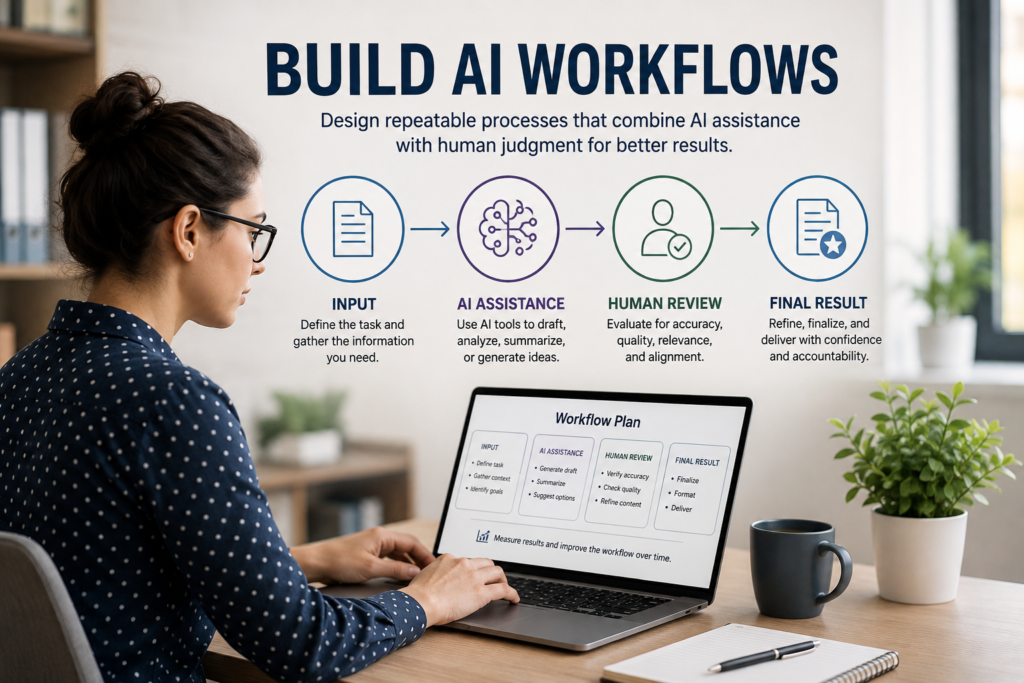
Artificial intelligence becomes more valuable when it helps you improve work you perform repeatedly—not just complete an occasional one-time task. A useful prompt may save a few minutes once. A well-designed AI workflow can potentially save time, improve consistency, support better analysis, or make a recurring process easier to manage.
But adding AI to a task does not automatically make the task better. An AI-assisted workflow can introduce new errors, unnecessary steps, inconsistent results, or more review work than expected. The real question is not simply whether AI can perform part of a task. It is whether AI can help you produce a better overall result.
This guide will show you how to build AI workflows systematically: choose an appropriate task, understand the existing process, decide where AI can add value, keep human judgment where it matters, test the workflow, measure the results, and improve the process over time.
What Is an AI Workflow?
An AI workflow is a repeatable process in which artificial intelligence assists with one or more steps needed to accomplish a task or produce a result.
The workflow might be simple. For example, you could use AI to turn meeting notes into a structured first draft, then review the draft yourself before sharing it.
Or the workflow could contain several stages: gathering information, organizing it, using AI to analyze or transform it, checking important claims, revising the output, obtaining human approval, and producing the final work.
The important word is workflow. Instead of asking only, “What can AI do for me?” you begin asking:
“Where in this process can AI create useful value, and what still needs human knowledge, verification, or judgment?”
That shift matters because the goal is not to automate as much work as possible. The goal is to create a process that produces a worthwhile result.
What Is an AI Workflow?
Choose a Good Task for an AI Workflow
Not every task becomes better when AI is added. A good starting point is usually a task you perform repeatedly, understand reasonably well, and can evaluate after AI assists with it.
Look for work where AI could reduce repetitive effort, help organize information, create a useful first draft, identify patterns, transform material into another format, or support analysis while leaving appropriate human review in place.
As a workflow becomes more complex, you may wonder whether AI should do more than assist with individual steps. Our AI Agents for Work & Business guide explains when an AI agent may make sense, how agents differ from ordinary AI workflows, and why a simpler workflow is often the better choice.
Look for Repetitive Work
Tasks performed weekly, daily, or several times each month can be good candidates because even modest improvements may accumulate over time.
Examples might include preparing recurring reports, organizing meeting notes, drafting routine communications, summarizing non-sensitive material, developing content outlines, categorizing information, or creating first drafts from an established structure.
The task does not need to be tedious. It simply needs to occur often enough that improving the process could create meaningful value.
Choose Work You Can Evaluate
Start with a task where you understand what a good result looks like.
If you cannot recognize whether the AI output is accurate, complete, useful, or appropriate, it will be difficult to determine whether the workflow is actually improving your work.
This is one reason existing expertise matters. AI can be particularly useful when you combine its capabilities with knowledge that allows you to evaluate and improve what it produces.
Consider the Consequences of Errors
Ask what would happen if the AI produced an incorrect, incomplete, biased, or misleading result.
A workflow for brainstorming internal ideas may tolerate more experimentation than one affecting customers, employees, finances, security, health, safety, legal matters, or other consequential interests.
Higher-consequence tasks may still benefit from AI, but they generally require stronger verification, safeguards, and human oversight.
Avoid Automating a Bad Process
Before adding AI, ask whether the existing task or process is worth doing in its current form.
Automating unnecessary steps does not make them valuable. If a process is confusing, duplicated, outdated, or poorly designed, simplifying the process may create more value than adding AI to it.
A useful question is:
“If AI were unavailable, would this still be a process worth improving?”
If the answer is no, reconsider the process before trying to automate it.
Map the Existing Process Before Adding AI
Before redesigning a task around AI, understand how the task works today. This gives you a baseline for deciding where AI might help and whether the new workflow actually improves the result.
You do not need complicated process-mapping software. For many tasks, a simple list of the current steps is enough.
Write Down the Current Steps
Choose one recurring task and describe how you complete it without changing anything yet.
For example, a recurring report might involve:
- Gather information from several sources.
- Organize the information.
- Identify the most important points.
- Draft the report.
- Check facts and calculations.
- Revise the wording.
- Send the report for review or distribution.
Once the process is visible, it becomes easier to identify where time is being spent and where AI might—or might not—be useful.
Record Your Baseline
Before introducing AI, record enough information to compare the old process with the new one.
Depending on the task, useful baseline measures might include:
- Time required to complete the task
- Number of manual steps
- Amount of rework or correction
- Consistency of the result
- Quality of the finished work
- Bottlenecks or particularly frustrating steps
You do not need perfect measurements. A reasonable baseline is more useful than relying later on the impression that the AI-assisted version “felt faster.”
This type of comparison is consistent with the measurement approach encouraged by the NIST AI Risk Management Framework, which emphasizes evaluating AI performance using appropriate measures and benchmarks rather than assuming that an AI-enabled process is automatically an improvement.
Identify the Bottleneck
Look for the part of the process that consumes disproportionate time, creates repetitive work, causes delays, or regularly requires unnecessary effort.
That may be a good place to test AI—but don’t assume it will be.
Sometimes the bottleneck requires judgment, specialized expertise, access to information the AI should not receive, or coordination with other people. In those cases, changing another part of the workflow may be more appropriate.
The objective at this stage is simple:
Understand the process before you try to improve it.
Decide Where AI Belongs in the Workflow
Once you understand the existing process, look at each step and ask whether AI could improve that particular part of the work.
You do not need to give AI the entire task. Often the strongest workflow uses AI selectively for the steps where it provides a clear advantage while keeping other steps under human control.
Look for AI’s Strengths
AI may be particularly useful for tasks such as generating alternatives, creating first drafts, reorganizing information, summarizing appropriate material, identifying patterns, transforming content into different formats, or helping explore possible approaches.
The value depends on the task and the tool. Focus on places where AI can reduce effort or improve the process without creating more problems than it solves.
Keep Human Expertise Where It Adds Value
Some parts of a workflow depend heavily on experience, context, relationships, accountability, creativity, professional judgment, or knowledge that AI does not have.
Rather than asking, “How much of this can I automate?” ask:
“Which parts benefit from AI, and which parts benefit from me?”
A strong AI workflow may deliberately keep important decisions, final approval, sensitive communication, quality control, or other consequential steps in human hands.
Start With One AI-Assisted Step
You do not need to redesign an entire process at once.
Choose one promising step and test AI there first. This makes it easier to determine what actually changed, identify unexpected problems, and decide whether the improvement is worth keeping.
If that step works well, you can gradually examine other parts of the process.
Watch for Work That AI Creates
AI can save time in one part of a task while creating additional work somewhere else.
For example, a faster first draft may require extensive fact-checking. An automated summary may omit important context. AI-generated code may require debugging and security review. A seemingly efficient process may create additional approval or correction steps.
Measure the whole workflow, not just the step AI performs.
That final principle is important enough to emphasize:
A faster AI step does not necessarily mean a faster or better workflow.
How to Build AI Workflows Around the Task
Once you’ve identified where AI may add value, design the complete process—not just the prompt.
A useful AI workflow should make clear what happens before AI is used, what the AI is expected to do, how its output will be evaluated, and what happens before the work is considered finished.
Define the Input
Decide what information the AI needs to perform its part of the task.
Good inputs may include clear instructions, relevant context, examples, source material, constraints, desired output format, and criteria for a successful result.
At the same time, consider whether the information is appropriate to provide to the AI system. Do not include confidential, personal, proprietary, security-sensitive, or otherwise protected information unless its use is authorized and appropriate for the tool and task.
Define the AI’s Job
Be specific about what you want AI to accomplish within the workflow.
Instead of giving AI a broad instruction such as “prepare my report,” you might assign it a narrower role: organize approved information into categories, identify recurring themes, create a first-draft structure, or suggest questions that deserve further investigation.
Clearly defining the AI’s role makes the workflow easier to evaluate and improve.
Define the Human Review
Decide in advance what a person needs to check after AI performs its part.
Depending on the task, review might include checking facts, calculations, sources, assumptions, tone, completeness, bias, compliance with requirements, or whether the result actually solves the original problem.
For important tasks, human review should be a designed step in the workflow—not something added only when the AI output looks suspicious.
Define the Finished Result
Determine what must happen before the task is actually complete.
An AI-generated draft is not necessarily the finished product. Completion may require verification, editing, approval, formatting, comparison with source material, professional review, or another human decision.
The AiCareerTrack Workflow Challenge
One of the best ways to learn how to build AI workflows is to test an AI-assisted process against the way you perform the task today.
Choose one recurring task that you understand well and can complete without AI. Then compare your existing process with an AI-assisted version.
Step 1 — Choose the Task
Select a task you perform regularly enough that improving it could create meaningful value.
For your first experiment, choose something with manageable consequences where you can evaluate the finished result yourself.
Step 2 — Record Your Current Process
Complete the task using your normal approach and record:
- How long the task takes
- The major steps involved
- Where most of your effort is spent
- Problems or bottlenecks you encounter
- Your assessment of the finished quality
This becomes your baseline.
Step 3 — Add AI to One Part of the Process
Choose one step where AI appears likely to help.
Define what information AI will receive, what you want it to accomplish, and what the output should look like. Keep the rest of the workflow as consistent as practical so you can better understand the effect of the change.
Step 4 — Review and Correct the AI Output
Do not measure only how quickly AI produces an answer.
Record the time and effort required to check the output, verify important information, correct errors, revise the work, and turn the AI-generated material into something you are willing to use.
Step 5 — Measure the Complete AI-Assisted Workflow
Record the total time required from beginning to finished result, including prompting, reviewing, correcting, revising, and any additional steps created by using AI.
Then compare the AI-assisted process with your original baseline.
Step 6 — Compare Quality
Ask whether the final result is:
- More accurate
- More complete
- More useful
- More consistent
- Easier to produce
- Better suited to its intended purpose
Speed is valuable only if the workflow still produces work of acceptable quality.
Step 7 — Decide What to Keep
At the end of the challenge, choose one of three conclusions:
KEEP IT — AI produced a worthwhile improvement and the workflow is worth repeating.
IMPROVE IT — AI showed potential, but the workflow needs better instructions, inputs, review, or process design.
DROP IT — AI did not create enough value to justify the additional complexity, risk, correction, or effort.
A successful experiment does not require AI to win.
Discovering that a particular task is better without AI is also a useful result.
Improve the Workflow Over Time
A workflow that works well once is not necessarily finished. AI tools change, tasks evolve, source information changes, and you may discover better ways to structure the process after using it several times.
Treat a useful AI workflow as something you can refine rather than something you design once and never revisit.
Track Recurring Problems
Pay attention to mistakes or weaknesses that appear repeatedly.
Does the AI regularly misunderstand certain instructions? Does it omit information you need? Are you repeatedly correcting the same type of error? Does one part of the review process take longer than expected?
Recurring problems often reveal where the workflow needs improvement.
Improve the Process, Not Just the Prompt
Better prompting can improve an AI workflow, but the prompt is only one part of the system.
You may get better results by improving the source information, changing when AI enters the process, dividing a large task into smaller steps, adding a verification stage, creating a reusable template, or changing what a human reviews.
Sometimes the best workflow improvement has little to do with the AI itself.
Measure Again
After changing the workflow, repeat the same measurements you used during your original test.
Compare total time, correction effort, consistency, and final quality. This helps determine whether the change actually improved the process rather than merely making it different.
Know When to Stop Optimizing
A workflow does not need to be perfectly automated or endlessly refined.
Once the process produces reliable value with an acceptable level of effort, risk, and human oversight, further optimization may provide little benefit.
The objective is not maximum AI use.
The objective is a better way of working.
Keep Human Judgment in the Workflow
An effective AI workflow does not necessarily remove people from the process. In many situations, the value comes from combining AI’s ability to generate, organize, transform, or analyze information with human experience, context, judgment, and accountability.
The amount of human involvement should reflect the task and its consequences.
The NIST AI RMF Playbook similarly treats human oversight as something that should be deliberately defined and evaluated based on the context, capabilities, and risks of the AI system rather than applied as an afterthought.
Decide What AI Can Assist With
Identify the parts of the workflow where AI can perform useful work without being given responsibility it should not have.
AI might help create a first draft, organize information, suggest alternatives, identify patterns, or prepare material for further analysis.
These activities can reduce effort while still leaving important decisions with the person responsible for the work.
Decide What Requires Human Judgment
Some steps may require expertise, contextual understanding, relationships, ethical judgment, professional responsibility, or accountability that should remain with people.
This can include approving important decisions, evaluating uncertain information, handling sensitive situations, interpreting consequences, communicating with people affected by a decision, or deciding whether the final result is appropriate to use.
Match Oversight to Consequences
Not every AI-assisted task needs the same amount of human review.
A low-consequence brainstorming workflow may need only a quick review. A workflow affecting customers, employees, finances, security, health, safety, legal interests, or other consequential matters may require substantially greater verification, expertise, approval, or oversight.
The goal is not to insert a human into every step unnecessarily. It is to ensure that human judgment remains where the consequences make it important.
Your Next Step
The best way to begin learning how to build AI workflows is to choose one recurring task that you understand well and complete often enough that improving it could matter.
Before adding AI, record how you perform the task today. Then choose one step where AI might create useful value and run the AiCareerTrack Workflow Challenge.
Measure the complete process—not merely how quickly AI generates an answer. Include the time required to prepare inputs, review the output, verify important information, make corrections, and produce the finished work.
Then make a decision:
KEEP IT if the workflow creates worthwhile improvement.
IMPROVE IT if AI shows potential but the process needs refinement.
DROP IT if AI adds more complexity, risk, or correction than value.
The goal is not to prove that every task needs AI. It is to discover where AI genuinely helps you work better.
If you haven’t already measured your broader AI readiness, the AiCareerTrack AI Readiness Self-Assessment can help you identify strengths and development priorities across AI Understanding, AI Communication, Evaluation & Judgment, Workflow Application, and Responsible AI Use.
Continue Building Your AI Skills
Building effective AI workflows combines several practical capabilities. Continue developing the skills that help you use AI effectively, evaluate its output, and apply it responsibly.
AI Fundamentals — Build a practical foundation for understanding what AI can do, where it has limitations, and how it is changing work.
Prompt Engineering — Learn how clearer instructions, useful context, constraints, examples, and follow-up directions can improve AI-assisted work.
How to Evaluate and Verify AI-Generated Information — Learn how to identify claims that deserve scrutiny, verify important information, recognize warning signs, and know when human expertise should take priority.
Responsible AI at Work — Learn practical habits for protecting information, recognizing risk, maintaining human accountability, and deciding when AI is appropriate for a workplace task.
Find Your AI Path — Explore how AI may fit your current work, career development, skill building, business, freelancing or consulting, and other legitimate opportunities.
Put It Into Practice
Don’t stop with the ideas in this guide. Choose one recurring task this week and complete the AiCareerTrack Workflow Challenge using the process above.
Compare your normal approach with an AI-assisted version, measure the complete workflow, evaluate the quality of the finished result, and decide whether to KEEP IT, IMPROVE IT, or DROP IT.
The goal is simple: find one place where AI genuinely helps you work better.